
Kanvas
A mobile art therapy app where users can engage in creative and interactive art activities as a coping mechanism for managing stress in their daily lives.

Role
Research, Product Design, UX/UI Design, Wireframing, User Testing, Prototyping,
Design System, Branding
Timeline
Fall 2025 - Spring 2026 - 24 Weeks
Tools
Figma, Illustrator
Role
Research, Product Design, UX/UI Design, Wireframing, User Testing, Prototyping,
Design System, Branding
Timeline
Fall 2025 - Spring 2026 - 24 Weeks
Tools
Figma, Illustrator
Context
Research Question
How can interaction design help teens and young adults cope with stress through digital art therapy practices?
The Problem
Stress is an increasingly common experience for teens and young adults, often driven by academic, financial, and social pressures. However, traditional therapy is not always accessible, there is stigma surrounding it, and many coping mechanisms are passive or unhealthy, failing to support emotional processing. This led me to explore how interaction design can support more active, expressive forms of stress relief through digital art therapy, an accessible adaptation of traditional art therapy.

Solution
Kanvas
A mobile art therapy platform for interactive, creative stress relief.
Key Features

User Modelling
System Map
I developed a system map based on the app’s core features and user flows. Users begin with onboarding to create a profile that tracks their progress, and navigate between three main pages: home, activities, and profile.

User Personas
The user personas represent the target audience for PlateMate, highlighting their pain points, needs, and goals. Defining personas informed the design of the product’s features to ensure they are intuitive and address real user challenges.


User Testing
Testing & Refinements
I conducted user tests with 5 young adult participants to receive feedback on my initial app prototype, allowing me to identify where I could improve the interface design and user experience.


Let’s Connect!
© 2026 Samantha Mirabella - Made with love
Resume
Research & Discovery
Statistics & Facts
The statistics I found highlight the scale of stress among teens and young adults, justifying the need for accessible and engaging mental health solutions like digital art therapy.

Benchmark Analysis
I explored existing art and mental health apps to understand current design approaches, strengths, and limitations. This helped me identify gaps in engagement, interactivity, and creativity, which informed opportunities for my design.


Key Takeaways
Research-Driven Design
Using research to ground my design decisions ensured that the concept of my digital product addressed real users needs, resulting in a thoughtful design outcome.
Simplicity and Intention
As I worked on this project, it reinforced the importance of reducing cognitive load and creating low-pressure experiences when designing for mental health. Small design decisions, such as guided prompts and minimal interfaces, play a significant role in making users feel comfortable and supported.
Prototype

Art Activities
Users can engage in short, guided, and low-pressure art activities through 3 types of activity formats; drawing, colouring, and collage-making. Prompts frequently provoke users to reflect on their emotions. As users progress through art activity stages they will collect badges and unlock new textures and shapes to use for their creations. A free play mode is also available for users to create at their leisure.

Profile Set Up
During the onboarding process, users set up their private personal profiles to maintain their progress. Users are prompted to create their own customizable avatar. As an optional step, users may draw an accessory of their choice on their avatar for a personalized touch
Progress & Mood Tracking
On the home page, users can track their progress in art activity stages. They may also track their moods by selecting how they are feeling, allowing AI to personalize art activity prompts tailored to users’ moods.


Badge Collection & Gallery
On the user profile page, they may view their badge collection to see all badges collected from completing art activity stages. They may also view their gallery where all artworks created are automatically saved, allowing users to review their creations and share them with others outside of the app.
AI Guidance
AI detects when users may need support with their creations and offers optional templates to help them continue and complete their artwork, reducing frustration while maintaining creative control.

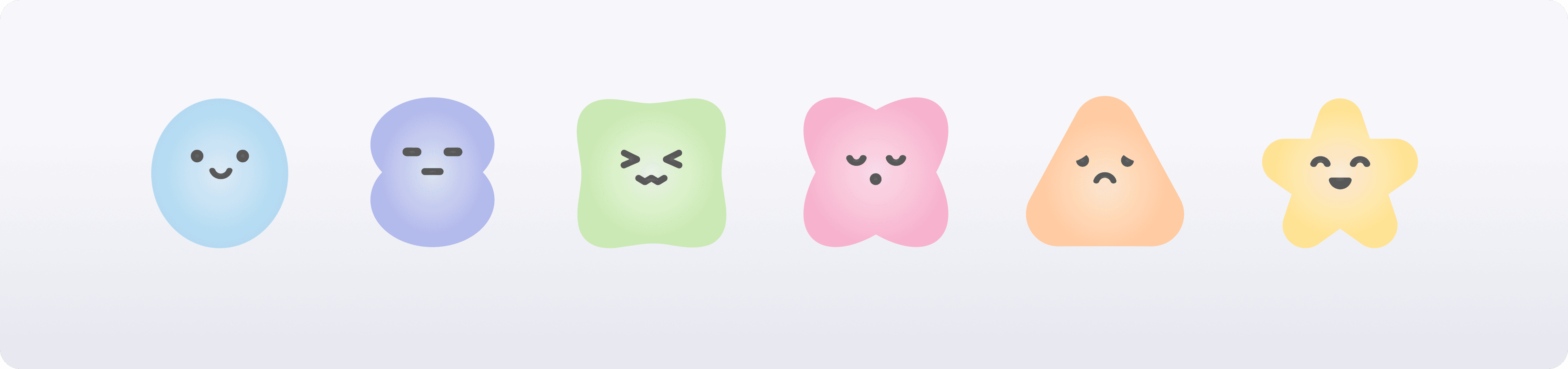
Avatar Design
Customizable Avatars
The avatar system uses shapes with customizable colours and facial expressions to create an approachable and low-pressure form of
self-representation.
Design System
Typography
I set clear typography guidelines to consistently apply across the app with assigned use cases. The simple sans-serif typeface enhances readability and clarity, supporting an accessible user experience. The curved edges of the letters also match the curved design elements throughout the app design.

Colours
I consistently applied the brand colours throughout the app, using shades of purple from the logo. The overall palette is kept neutral to ensure users’ artworks remain the primary visual focus, supporting personal expression without visual distraction.

Iconography
A concise set of recognizable icons was used to improve clarity, consistency, and support a user-centered experience.


Brand Applications
Marketing Materials
I adapted the product’s branding to marketing materials including posters, social media ads, and stickers.